

Your phone sends, Mapulse shows
GPS position, distance, pace and heart rate come through in real time while you run. You press start, that's all.
Mapulse shares your GPS position and heart rate in real time while you run. Your loved ones open a link, follow your progress on the map and know where to wait for you.
iPhone and Android · Free
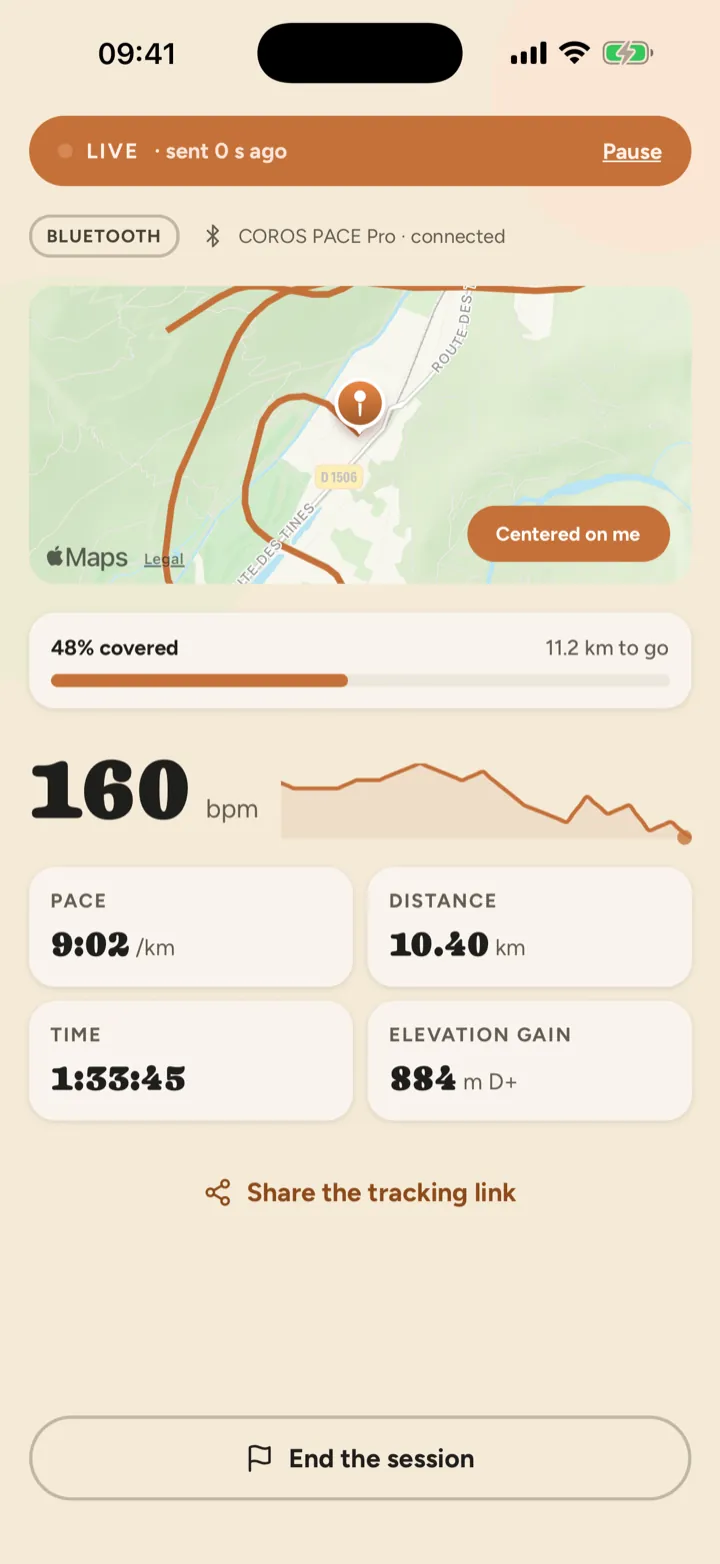
GPS position, distance, pace and heart rate come through in real time while you run. You press start, that's all.
Your loved ones follow from their browser. No account to create, no download, nothing to explain.
Invite your running partners to the same session: each has their own color, everyone on the same track.
Whoever creates the session invites the other runners with a link. Each joins from their own phone, starts when they start, and appears on the same map in their own color. Family and friends still have just one link to open.
Each relay runner joins the session from their link. Your loved ones follow the baton from one runner to the next on the same map.
Each runner has their own color, there's one page for those waiting at the aid station, and everyone can see who is where.
You start together and may finish apart: the page shows each runner's distance, and one can finish while the other is still running.
A name, a date, and the GPX track of your route if you like.
Share the tracking link by message. Add the runners starting with you.
The session goes live. Your phone can stay in your pocket.
At the finish, the summary keeps your track, times and effort in your history.
The tracking page opens on your map: your position, the kilometers covered and those still to go, your heart rate and the elevation, refreshed as the run goes on. Your loved ones no longer wonder where you are, and they head to the finish at the right moment.
What your loved ones see, in detailMapulse is an app for iPhone and Android that lets a runner share their position and vital signs live with the people of their choice. They follow from a link, with no account and no install, on a phone or a computer. The app is free.
No. You send them a link and they open it in their browser. No account, no download. The link is private: it isn't listed anywhere and can't be guessed.
Your phone alone is enough for your position. With an iPhone, the Apple Watch adds your heart rate, speed and distance. With an Android phone, a Wear OS watch (Wear OS 6 or later) gets a small Mapulse app that makes it send your heart rate. With either phone, a chest strap or watch that broadcasts its heart rate over Bluetooth can do it too; the setting depends on the brand. Devices from Coros, Amazfit and Decathlon have been tested with Mapulse. Garmin, Polar, Suunto, Huawei and Fitbit broadcast heart rate according to their makers, but we haven't checked it yet. The setting for each brand is on the compatible watches page.
Only the people who have your link, and only after your explicit consent. Consent is asked before the first share and can be withdrawn at any time in the settings, even during a run.
Yes. Invited runners join the session from their link and appear on the same map, each in their own color.
Nothing is lost. Your data waits on the phone and is sent as soon as the signal returns, in order and without duplicates: your loved ones' track fills in without a gap. During the outage, their page shows that your position is from before, instead of pretending to be live.
Your phone's GPS sends a point as soon as you have moved five meters. On your loved ones' side, data less than a minute old is shown as "live", up to ten minutes old as "delayed", and beyond that as "offline".
On iPhone, standing still with the phone locked in a pocket, we measured 1% of battery used in thirty minutes. On Android, we have no measurement yet. During a run, active GPS uses more; we have no published measurement over a full marathon yet, and we won't give a figure until we have one.
Mapulse is free, with no subscription. It's an independent project, funded by its creator, with no ads, and your data is never sold.
Prepare your session in two minutes, send the link, start your watch.